Database Maintenance Extension
Overview
The Database Maintenance extension runs selected maintenance operations against Atria's OLM and AtriaConfigService databases. It can remove retained operational records, maintain indexes and shrink databases. Configure it as a job so that maintenance runs at an appropriate time for your platform.
Only operations you enable run. All operation flags default to false, so importing the extension or saving configuration {} does not enable data cleanup.
The job processes enabled operations in this order:
- Trim Azure sync jobs, logs, request logs and job runs.
- Trim Config Service access logs and application registrations.
- Perform index maintenance.
- Shrink OLM and/or AtriaConfigService if enabled and a preceding relevant operation succeeded.
- Remove duplicate object-audit entries if enabled.
Installation
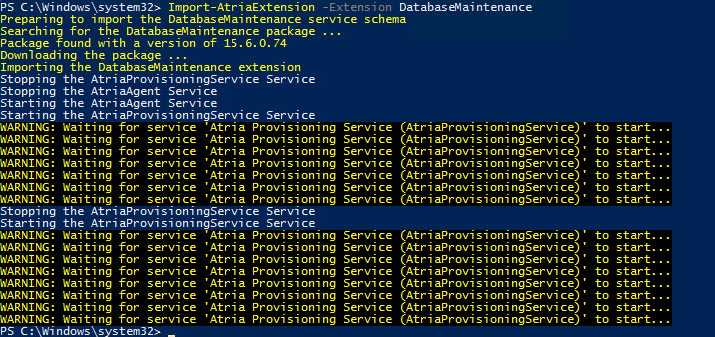
On the Provisioning Server, open an administrative PowerShell session:
Get-AtriaComponent -Name DatabaseMaintenance
Import-AtriaExtension -Extension DatabaseMaintenance
See extension import parameters for version and restart options.
Open Configuration > Provisioning & Debug Tools > Jobs. Check for an existing maintenance job before choosing + Add. For a new job:
- Label:
Database Maintenance - Task:
Database Maintenance - Execution: Scheduled, or on demand for an initial test.
- Log Level: Verbose while verifying the setup.
- CRON Expression: For example,
0 0 * * 0for Sunday at 00:00 UTC. - Configuration: Use the settings below.
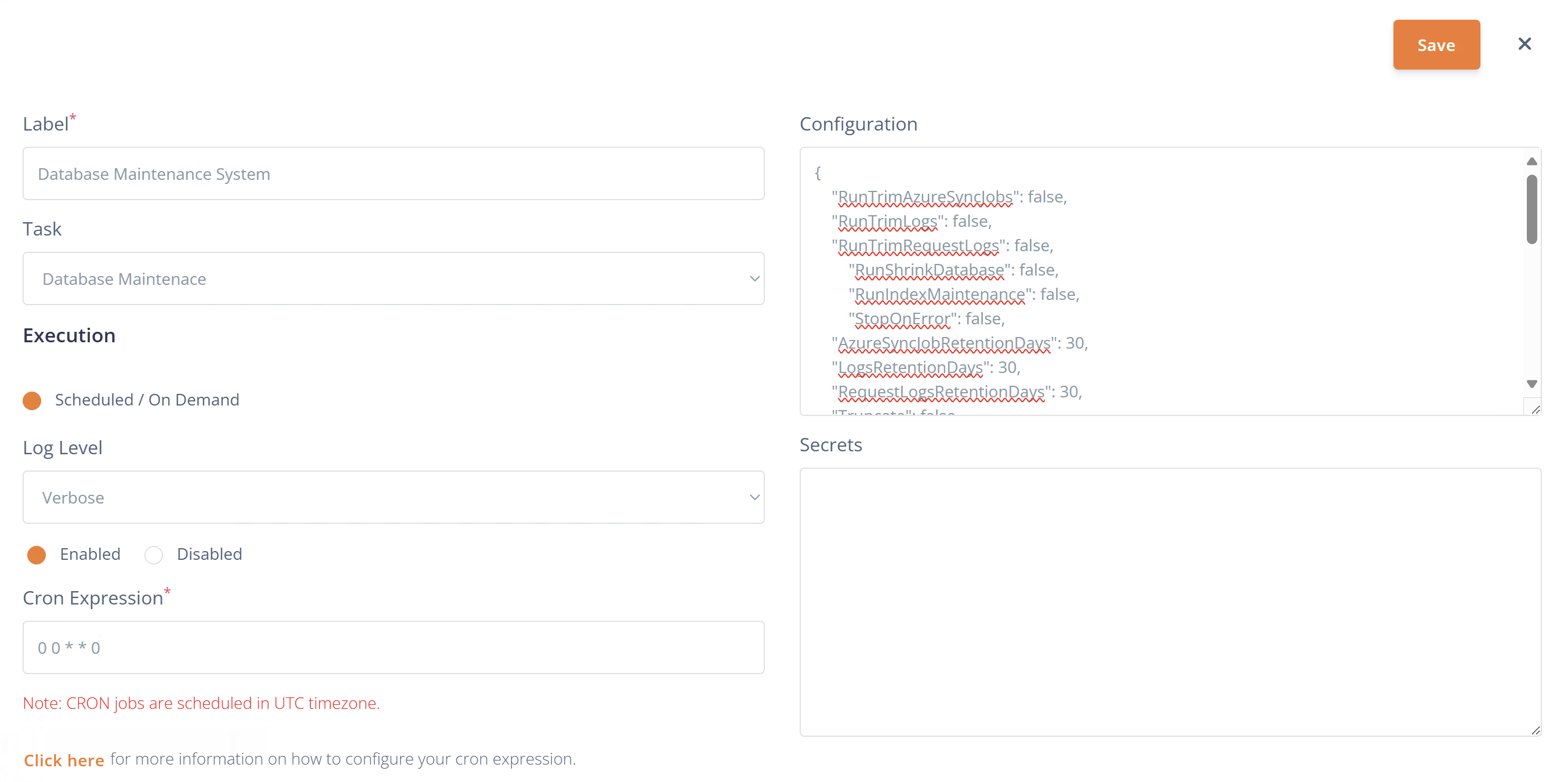
Save the job, then use its actions menu to run it manually and inspect the run details.

Configuration
Example: trim operational history
This example enables retention-based cleanup in OLM and the Config Service, keeping index maintenance and shrinking disabled. Set retention periods to suit your reporting and support needs before running it; trimming deletes older records.
{
  "RunTrimAzureSyncJobs": true,
  "RunTrimLogs": true,
  "RunTrimRequestLogs": true,
  "RunTrimJobRuns": true,
  "RunTrimConfigServiceAccessLogs": true,
  "RunTrimConfigServiceAppRegistrations": true,
  "RunIndexMaintenance": false,
  "RunShrinkDatabase": false,
  "RunTrimDuplicateObjectsAT": false,
  "StopOnError": true,
  "AzureSyncJobRetentionDays": 30,
  "LogsRetentionDays": 30,
  "RequestLogsRetentionDays": 30,
  "JobRunsRetentionDays": 90,
  "AccessLogsRetentionDays": 90,
  "AppRegistrationsRetentionDays": 30,
  "BatchSize": 5000,
  "TimeOutInMinutes": 20
}
The flags and defaults below describe the extension implementation. Available options depend on the installed extension version.
Configuration flags
| Property | Default | Operation |
|---|---|---|
RunTrimAzureSyncJobs | false | Trim retained Azure sync-job records. |
RunTrimLogs | false | Trim retained log records. |
RunTrimRequestLogs | false | Trim retained request logs. |
RunTrimJobRuns | false | Trim retained job-run history. |
RunTrimConfigServiceAccessLogs | false | Trim access logs in the Config Service database. |
RunTrimConfigServiceAppRegistrations | false | Trim Config Service application registrations and their scopes. |
RunIndexMaintenance | false | Run index maintenance using IndexMaintenanceProperties. |
RunShrinkDatabase | false | Shrink a database after a successful relevant trimming or index operation. |
RunTrimDuplicateObjectsAT | false | Remove consecutive duplicate object-audit entries matching the procedure's comparison fields. This does not use a retention-days setting. |
StopOnError | false | Stop on an error in the trimming or index stages. Otherwise those stages log the error and continue. Shrink and duplicate-audit cleanup failures stop the job regardless of this flag. |
Retention settings
| Property | Default | Applies to |
|---|---|---|
AzureSyncJobRetentionDays | 30 | Azure sync-job records. |
LogsRetentionDays | 30 | Log records. |
RequestLogsRetentionDays | 30 | Request logs. |
JobRunsRetentionDays | 90 | Job-run history. |
AccessLogsRetentionDays | 90 | Config Service access logs. |
AppRegistrationsRetentionDays | 30 | Config Service application registrations. |
A retention setting takes effect only when its corresponding operation is enabled.
Batch and timeout settings
| Property | Default | Behaviour |
|---|---|---|
BatchSize | 5000 | Records per deletion batch for the Azure sync-job and log trimming operations. Batching limits the size of each deletion. |
TimeOutInMinutes | 20 | Command timeout used for trimming operations. Index maintenance has its own timeout below. |
Large initial cleanups may need a longer timeout. Review the job-run messages to identify the stage that needs adjustment.
Shrink settings
| Property | Default | Behaviour |
|---|---|---|
Truncate | false | For OLM, selects whether shrinking can release free space to the operating system. With false, the procedure uses NOTRUNCATE. This is a shrink option, not a request to truncate tables. |
ShrinkTargetPercent | 10 | Target percentage of free space for the OLM shrink when Truncate is true; also passed to the Config Service shrink. |
RunShrinkDatabase alone does not trigger shrinking. OLM is eligible after a successful OLM trim or index operation targeting OLM; AtriaConfigService is eligible after a successful Config Service trim. Config Service shrinking uses ShrinkTargetPercent and does not receive the Truncate flag.
Index maintenance
Set RunIndexMaintenance to true to use the following nested configuration. This example shows the defaults:
{
  "RunIndexMaintenance": true,
  "IndexMaintenanceProperties": {
    "Databases": "OLM",
    "FragmentationLow": null,
    "FragmentationMedium": "INDEX_REORGANIZE,INDEX_REBUILD_ONLINE,INDEX_REBUILD_OFFLINE",
    "FragmentationHigh": "INDEX_REBUILD_ONLINE,INDEX_REBUILD_OFFLINE",
    "FragmentationLevel1": 5,
    "FragmentationLevel2": 30,
    "MinNumberOfPages": 500,
    "FillFactor": 100,
    "PadIndex": null,
    "UpdateStatistics": null,
    "OnlyModifiedStatistics": "N",
    "TimeOutInMinutes": 10
  }
}
Property under IndexMaintenanceProperties | Default | Purpose |
|---|---|---|
Databases | OLM | Comma-separated database list. If targeting other databases, ensure OLMUser has the required permissions there. |
FragmentationLow | null | Action below the lower fragmentation threshold. |
FragmentationMedium | INDEX_REORGANIZE,INDEX_REBUILD_ONLINE,INDEX_REBUILD_OFFLINE | Actions for the middle fragmentation range. |
FragmentationHigh | INDEX_REBUILD_ONLINE,INDEX_REBUILD_OFFLINE | Actions for the high fragmentation range. |
FragmentationLevel1 | 5 | Lower fragmentation threshold, as a percentage. |
FragmentationLevel2 | 30 | Upper fragmentation threshold, as a percentage. |
MinNumberOfPages | 500 | Minimum index size in pages. |
FillFactor | 100 | Fill factor used when rebuilding indexes. |
PadIndex | null | Index padding option. |
UpdateStatistics | null | Statistics to update: ALL, TABLE, COLUMN, or null for no statistics update. |
OnlyModifiedStatistics | N | Whether statistics updates are limited to modified statistics. |
TimeOutInMinutes | 10 | Index-maintenance command timeout. |
Stored procedures
The OLM maintenance operations use:
dbo.sp_MaintenanceTrimAzureSyncJobsdbo.sp_MaintenanceTrimLogsdbo.sp_MaintenanceTrimRequestLogsdbo.sp_MaintenanceTrimJobRunsdbo.sp_MaintenanceIndexOptimizedbo.sp_MaintenanceShrinkDatabasedbo.sp_MaintenanceTrimDuplicateObjectsAT
Config Service maintenance is requested through its maintenance client.
Check results
Review the job run for each enabled stage and its errors or affected-row count. When StopOnError is false, an overall successful result can still contain errors from earlier stages. If you need the run to fail when a trimming or index stage fails, set StopOnError to true.
For execution, scheduling and log controls, see Jobs System and the CRON expression guide.
Log messages
| Code | Log Message | Log Level |
|---|---|---|
| DM-00 | Initialize Database Maintenance Configuration | Verbose |
| DM-01 | Started Running Database Maintenance Scripts | Verbose |
| DM-02 | Finished Running Database Maintenance Scripts | Verbose |
| DM-03 | Error While Running Database Maintenance Database. The error occurred is: {error message} | Error |
| DM-04 | Retrieve Database Maintenance Parameters | Verbose |
| DM-11 | Call Trim Azure Sync Job Script | Info |
| DM-12 | Error While Trimming Azure Sync Job. The error occurred is: {error message} | Error |
| DM-13 | Finished Running Trim Azure Sync Job Script | Info |
| DM-21 | Call Trim Logs Script | Info |
| DM-22 | Error While Trimming Logs Script. The error occurred is: {error message} | Error |
| DM-23 | Finished Running Trim Logs Script. {number of rows} Rows are affected | Info |
| DM-31 | Call Trim Request Logs Script | Info |
| DM-32 | Error While Trimming Request Logs Script. The error occurred is: {error message} | Error |
| DM-33 | Finished Running Trim Request Logs Script | Info |
| DM-41 | Call Shrink Database Script | Info |
| DM-42 | Error While Running Shrink Database Script. The error occurred is: {error message} | Error |
| DM-43 | Finished Running Shrink Database Script | Info |
| DM-51 | Call Index Optimize Script | Info |
| DM-52 | Error While Optimizing Indexes. The error occurred is: {error message} | Error |
| DM-53 | Finished Running the Index Optimization Script | Info |
| DM-61 | Call Trim ConfigService Access Logs Script | Info |
| DM-62 | Error While Running Trim ConfigService Access Logs Script. The error occurred is: {error message} | Error |
| DM-63 | Finished Running Trim ConfigService Access Logs Script | Info |
| DM-71 | Call Trim ConfigService App Registrations Script | Info |
| DM-72 | Error While Running Trim ConfigService App Registrations Script. The error occurred is: {error message} | Error |
| DM-73 | Finished Running Trim ConfigService App Registrations Script | Info |
| DM-81 | Call Trim Job Runs Script | Info |
| DM-82 | Error While Running Trim Job Runs Script. The error occurred is: {error message} | Error |
| DM-83 | Finished Running Trim Job Runs Script | Info |
| DM-91 | Call Trim ObjectsAT Entries Script | Info |
| DM-92 | Error While Trimming ObjectsAT Entries Script. The error occurred is: {error message} | Error |
| DM-93 | Finished Running Trim ObjectsAT Entries Script | Info |