Workspace Items
Overview
Workspace Items represent the individual applications, resources, or configuration settings that administrators can assign to customers and users. Before creating an item, configure the appropriate Workspace Item Type, which provides its identity provider, group behavior, default naming, properties, and automation.
Examples of Workspace Items include:
- Microsoft Word (Desktop Application)
- Company Newsletter (Distribution List)
- Office Printer 1 (Printer)
The item's group type determines its scope and how Atria grants access.
Workspace Item group types
Choose the group type that matches the scope of the resource and the required membership model.
Shared
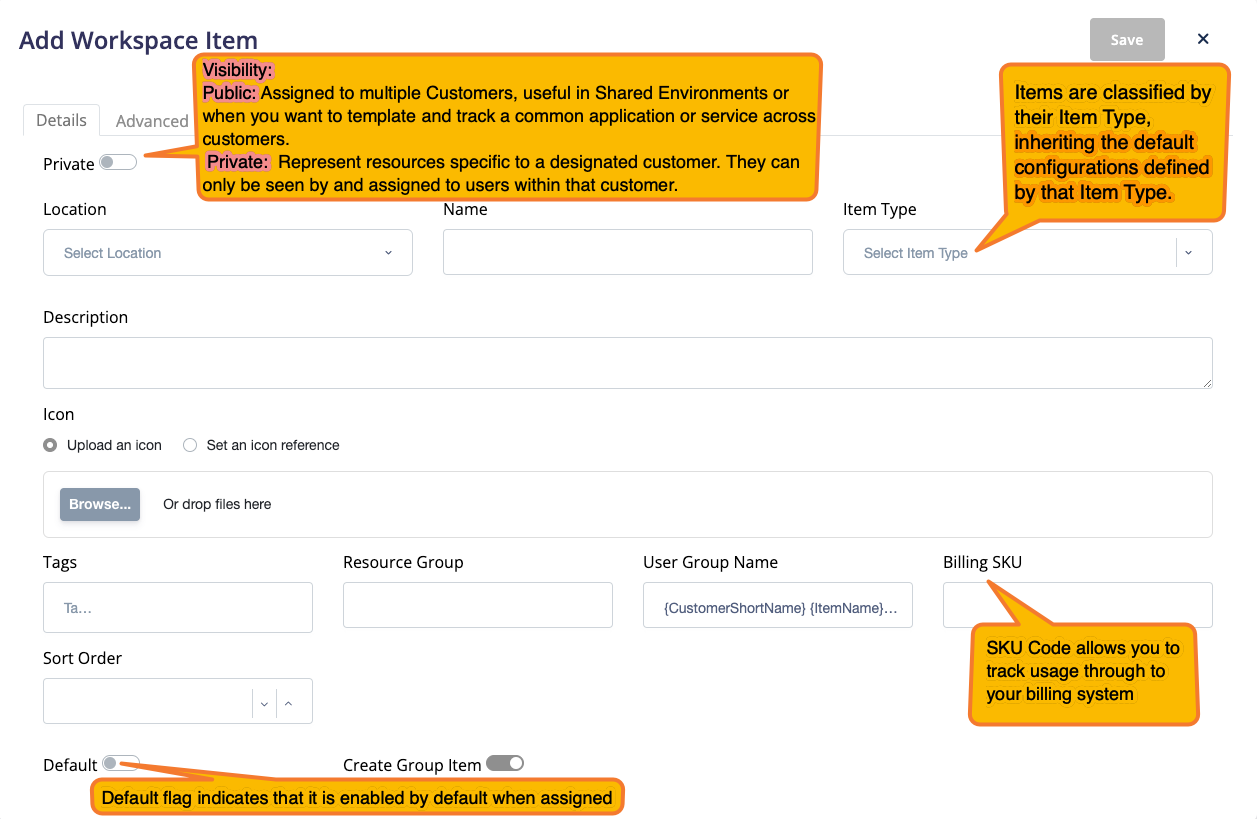
Shared Workspace Items can be assigned to multiple customers. They provide a consistent definition for an application, resource, or configuration and are commonly used in multi-tenant Active Directory environments.
For an Active Directory-backed Shared item, Atria adds the user to a customer-specific user group. That group is nested in the resource group that represents the Workspace Item; this is known as an indirect assignment.

Private
Private Workspace Items belong to a single Atria customer and are not available to other customers. Use them for resources that are unique to a customer or that already exist in the customer's environment.
For an Active Directory-backed Private item, Atria adds users directly to the resource group that represents the Workspace Item; this is known as a direct assignment.

Groupless
A Shared or Private item can be Groupless. Atria does not create a directory group for the item, but it still records customer and user assignments. This is useful for billing, licence tracking, or running automation that does not require group membership.
Customer Only
Customer Only items are Private items that can be assigned to a customer but not to individual users. Use them to delegate customer-level permissions or trigger automation such as Customer Item Provision and Customer Item Deprovision.

| Group type | Scope and assignment behavior |
|---|---|
| Private (direct) | Belongs to one customer. Users are added directly to the resource group. |
| Shared (indirect) | Can be published to multiple customers through Workspace Lists. Users are added to a customer-specific user group that is nested in the resource group. |
| Groupless | Creates no directory group. Atria records the assignment for logical tracking and automation. |
| Customer Only (Private) | Can be assigned to one customer, but not to users. |
Creating a Workspace Item
Navigate to Services > Workspace > Workspace Items and select Add.
By default, this page is available to users with the Service Provider Administrator role. Administrators working in a customer context can create Private items when their delegated permissions allow it.
Creating a Workspace Item
Complete the fields shown for the selected Item Type and group configuration, then save the item.
Follow this scribe to see the process in action: Workspace - Creating a new Workspace Item.
Interface

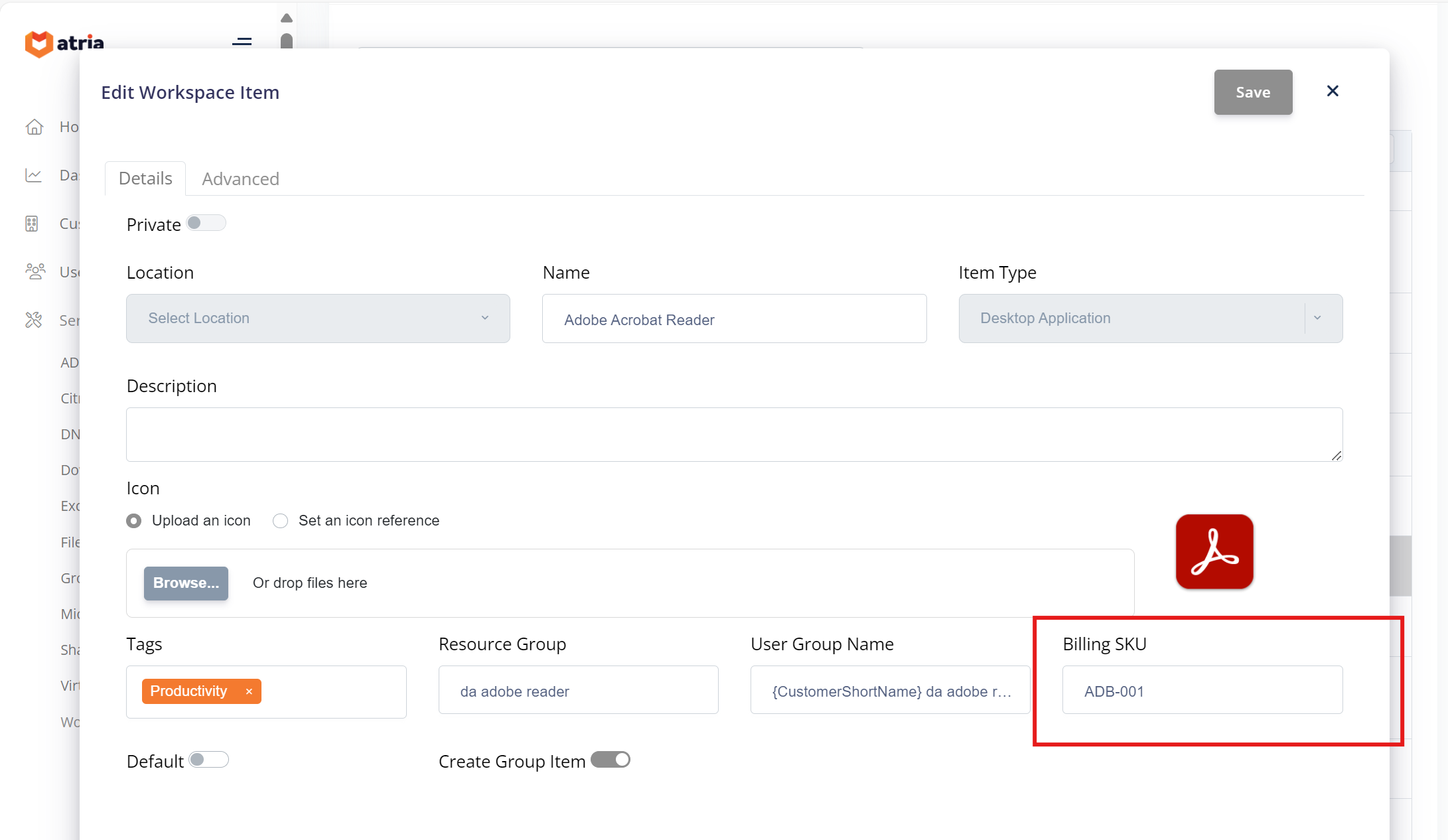
Adobe Acrobat Reader Desktop Application configured for AD
Workspace Item provisioning properties
Workspace Item requests include item identity, list, directory target, configuration, customer, and—when applicable—user properties. For the complete property list and the customer and user provisioning lifecycles, see the Workspace Item Provisioning Rule Reference.
Temporary group membership
Enable Membership Duration when access to an Active Directory-backed Workspace Item should expire automatically. Enter the required Duration Days and Duration Hours; the combined duration must be greater than zero, and the hours value must be between 0 and 23.
When Atria assigns a user to the item, it adds the user to the associated Active Directory group using the -MemberTimeToLive value rather than creating permanent group membership. Active Directory removes the group membership when the duration expires, and Workspace Group Reconciliation then removes the corresponding Workspace Item assignment from Atria.
The following rules apply:
- The selected Item Type must use Active Directory as its identity provider.
- Create Group Item must be enabled, and the item cannot be Customer Only.
- Enabling Membership Duration also enables Keep in Sync with Active Directory, which is required to reconcile expired membership with Atria.
- Existing permanent group members are not converted to temporary members. Use a new or empty group when enabling this option; Atria prevents the option from being enabled for a resolved existing group that already contains members.
- The configured duration is applied when a user is added. Changing the duration does not update a temporary membership that already exists.
Workspace Group Reconciliation
Workspace Group Reconciliation keeps the membership recorded in Atria aligned with the membership of the corresponding Active Directory group. This is important for temporary membership because Active Directory expires the group membership independently; without reconciliation, the user could remain assigned to the Workspace Item in Atria even though their directory access has ended.
During the next reconciliation run, Atria treats the directory group as the authoritative source and compares its members with the Workspace Item assignments. If an expired user is no longer present in the group, Atria removes the associated Workspace Item assignment and records the action in the reconciliation logs. There can therefore be a short interval between Active Directory expiring the membership and the reconciliation job updating Atria.
Enabling Membership Duration enables Keep in Sync with Active Directory for the item, but it does not enable the reconciliation capability for the wider environment. Before using temporary membership, confirm that:
- The
Atria.WorkSpace.GroupReconciliationfeature flag is enabled. - The Workspace reconciliation jobs are enabled and running successfully.
- The item is backed by a valid Active Directory group and is not Groupless or Customer Only.
- Where required for an upgraded environment, the Directory Web Service account has Replicating Directory Changes permission at the domain root.
- Reconciliation logs are monitored for missing groups or failed membership updates.
For rollout instructions, supported directory sources, permissions, limitations, and logging behavior, see Workspace Group Reconciliation.
Active Directory prerequisite
Temporary group membership requires the Privileged Access Management Feature to be enabled for the Active Directory forest; run the following command once from an elevated PowerShell session using an account with permission to modify the forest configuration. Enabling this optional feature is forest-wide and irreversible, so first confirm that the forest is at the Windows Server 2016 functional level and validate domain controller compatibility, replication health, backup arrangements, and organizational change approval.
$forest = Get-ADForest
Enable-ADOptionalFeature `
    -Identity 'Privileged Access Management Feature' `
    -Scope ForestOrConfigurationSet `
    -Target $forest.Name
Workspace Lists
Private Workspace Items can be made available to a customer through the Reseller service configuration. For more information, see Reseller and Customer Provisioning.
To publish Shared items to resellers and customers, add them to a Workspace List.